
Installation
Replace your ox_lib folder in a few minutes. No other resource needs to change.
ox_lib Redesigned is a complete ox_lib, not an add-on. It takes the place of the ox_lib folder you already have.
1. Stop the server and back up ox_lib
Section titled “1. Stop the server and back up ox_lib”Stop the server, then copy your current ox_lib folder somewhere outside resources. You can go back to it at any time.
2. Replace the folder
Section titled “2. Replace the folder”Delete the old ox_lib folder and put the ox_lib Redesigned one at the same place. Its name must stay exactly ox_lib: other resources load files from @ox_lib.
Where ox_lib usually lives:
resources/[ox]/ox_lib, as installed by the Qbox recipe.
The QBCore recipe doesn’t include ox_lib. Put it in any category folder, for example resources/[standalone]/ox_lib, and start it before the resources that use it:
ensure ox_libresources/[standalone]/ox_lib, as installed by the ESX Legacy recipe.
Anywhere in resources, started before the resources that use it:
ensure ox_lib3. Start the server
Section titled “3. Start the server”Start the server normally. The interface uses the Liquid Dark theme until you configure it.
Don’t restart ox_lib alone while players are connected: every resource that depends on it restarts with it. A full server restart is safer.
4. Check that it works
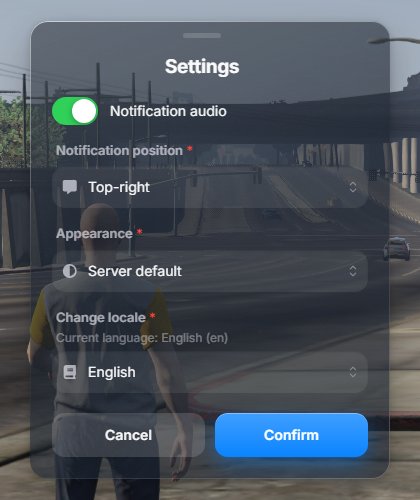
Section titled “4. Check that it works”Join the server and type /ox_lib. The settings window should look like this, with an Appearance option:
Admins can also open the theme editor with /oxtheme.