
Configuration
Every setting is a convar in server.cfg. All of them are optional, and players can change most of them for themselves.
Without any setting, ox_target Redesigned uses the mini eye crosshair and the list style, in your ox_lib Redesigned theme or in Liquid Dark. Add only the lines you want to change.
setr ox_target:theme "vyro-violet"setr ox_target:style "callout"These lines are the defaults. Each player can change their own with /oxtarget, unless you lock it with ox_target:playerSettings "0".
All settings
Section titled “All settings”| Convar | Values | Default | What it does |
|---|---|---|---|
ox_target:theme |
auto, liquid-dark, liquid-light, vyro-violet, graphite |
auto |
auto follows ox_lib Redesigned when the server runs it, and uses Liquid Dark otherwise. A theme name forces that theme, even over ox_lib Redesigned. |
ox_target:mode |
center, cursor |
center |
center aims with a crosshair in the middle of the screen, cursor with the mouse. See Cursor mode. |
ox_target:crosshair |
minieye, eye, dot, ticks, minidot |
minieye |
Crosshair of the center mode. ticks shows four corners. |
ox_target:cursor |
arrow, dot |
arrow |
Pointer of the cursor mode. |
ox_target:style |
list, pills, callout, minimal |
list |
How the options look. See Option styles. |
ox_target:side |
right, left |
right |
Side of the crosshair where the options show. |
ox_target:size |
80 to 130 |
100 |
Size of the crosshair and options, in percent. |
ox_target:toggleHotkey |
1 or 0 |
0 |
1: press the key once to start targeting and again to stop, instead of holding it. |
ox_target:shortcuts |
1 or 0 |
1 |
Keys 1 to 9 pick an option once the cursor shows. |
ox_target:highlight |
1 or 0 |
1 |
An outline on the vehicle or object you aim at, and a marker above people. |
ox_target:sounds |
1 or 0 |
1 |
Soft sounds on hover and select. |
ox_target:playerSettings |
1 or 0 |
1 |
0 locks /oxtarget: every player keeps the settings above. |
Unknown values are ignored, and the size is kept between 80 and 130.
Themes
Section titled “Themes”| Theme | Accent | Glass |
|---|---|---|
liquid-dark |
#0a84ff |
Dark |
liquid-light |
#0a84ff |
Light |
vyro-violet |
#a855f7 |
Dark, tinted with violet |
graphite |
#8e8e93 |
Dark and denser, with tighter corners |
These are the four presets of ox_lib Redesigned, at their default settings. To also tune the opacity, reflections or corner radius, use ox_lib Redesigned: with ox_target:theme "auto", ox_target follows everything you set in /oxtheme.
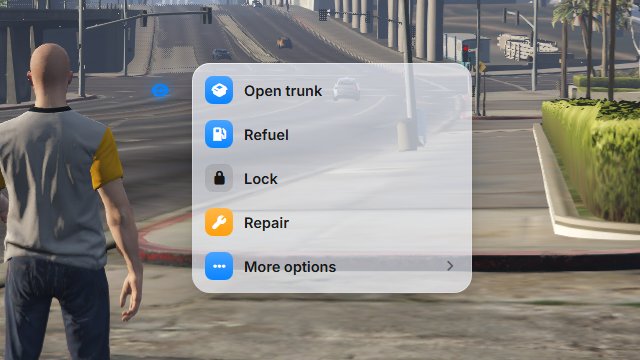
Which theme shows
Section titled “Which theme shows”From strongest to weakest:
- The theme a player picks in
/oxtarget. ox_target:theme, when it isn’tauto.- The theme of ox_lib Redesigned 1.1.0 or newer, including the appearance each player picks in
/ox_lib. - Liquid Dark.
The color works the same way: a color picked in /oxtarget wins over the accent of the theme.
Examples
Section titled “Examples”setr ox_target:theme "liquid-light"setr ox_target:mode "cursor"setr ox_target:cursor "dot"setr ox_target:style "pills"setr ox_target:size "115"setr ox_target:playerSettings "0"Settings from the official ox_target
Section titled “Settings from the official ox_target”These still work as in the official documentation:
| Convar | Default | What it does |
|---|---|---|
ox_target:defaultHotkey |
LMENU |
Key that starts targeting, Left Alt. Players can change it in Settings › Key Bindings › FiveM. |
ox_target:leftClick |
1 |
Mouse button that gives the cursor to the options, or opens them under the pointer in cursor mode. 1 is the left button, 0 the right one. |
ox_target:drawSprite |
24 |
How many nearby zones get a dot drawn on them. 0 turns the dots off. |
ox_target:defaults |
1 |
Options to open and close vehicle doors. 0 removes them. |
ox_target:debug |
0 |
1 adds test zones and options, for script developers. |