
Player settings
What players can change for themselves with /ox_lib.
Players type /ox_lib to open their own settings. ox_lib Redesigned adds one option, Appearance, next to the ones ox_lib already had.
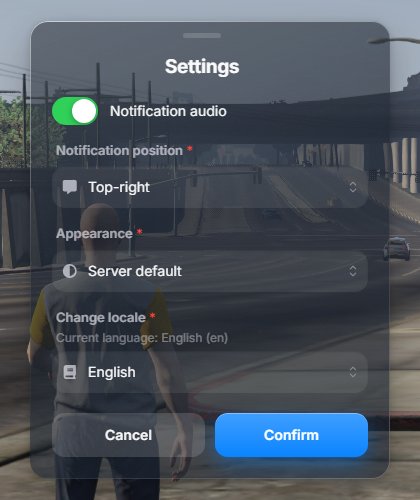
| Setting | Choices |
|---|---|
| Notification audio | On or off. |
| Notification position | Top right, top, top left, center right, center left, bottom right, bottom, bottom left. |
| Appearance | Server default follows your configuration. Dark, Light and Auto force that glass mode for this player only. |
| Language | Every language ox_lib ships. Hidden when the server sets setr ox:userLocales 0. |
Choices are saved on the player’s computer, so they stay the next time they join.
Appearance only changes the glass mode. Colors, shapes and everything else stay as the server configured them.