
Player settings
What players can change for themselves with /oxtarget.
Players type /oxtarget to open their own targeting settings. The crosshair and sample options stay visible behind the panel, so every change shows before it’s saved.
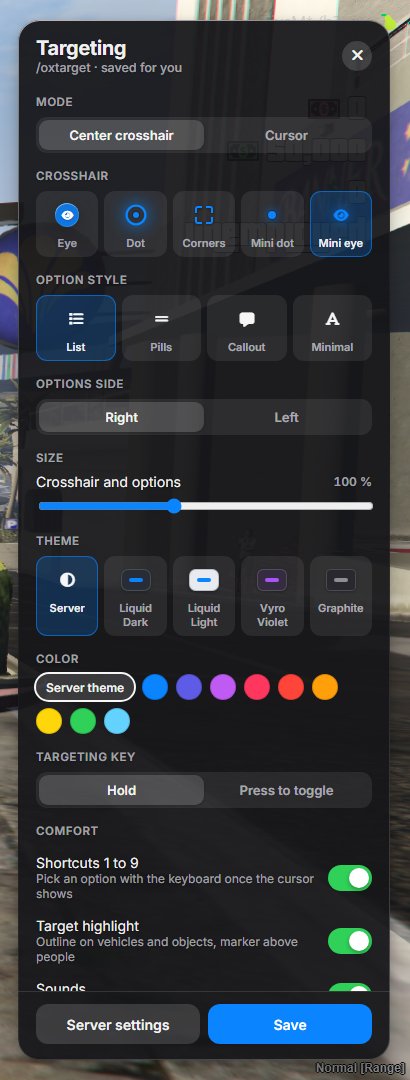
| Setting | Choices |
|---|---|
| Mode | Center crosshair, or Cursor to aim with the mouse. |
| Crosshair | Eye, Dot, Corners, Mini dot, Mini eye. In cursor mode, this becomes Cursor: Arrow or Dot. |
| Option style | List, Pills, Callout, Minimal. |
| Options side | Right or Left of the crosshair. |
| Size | Crosshair and options, from 80 to 130 %. |
| Theme | Server follows your configuration. Liquid Dark, Liquid Light, Vyro Violet and Graphite force that theme for this player only. |
| Color | Server theme uses the accent of the theme, or one of nine colors. |
| Targeting key | Hold, or Press to toggle: once to start, again to stop. |
| Comfort | Shortcuts 1 to 9, Target highlight, Sounds, Reduced motion. |
Save keeps the choices on the player’s computer, so they stay the next time they join. Server settings fills the panel with your server.cfg defaults; saving them makes the player follow your configuration again, even when you change it later.
Locking the panel
Section titled “Locking the panel”To give every player the same targeting, lock the panel:
setr ox_target:playerSettings "0"/oxtarget then tells players that the server doesn’t allow changing these settings, and everyone uses the ox_target:* lines of your configuration.